Data Structure provided by JAVA is array, which stores a fixed-size sequential collection of elements of the same datatype. An array is used to store a collection of data of same datatype.
Instead of declaring individual variables, such as var0, var1, …, and var99 of same datatype, you declare one array variable such as var and use var[0], var[1], and …, var[99] to represent individual variables.
This blog contains how to declare array variables, create arrays, and process arrays using indexed variables.
Declaring Array Variables:
you must declare a variable to reference the array, and you must specify the type of array the variable can refer .
For Example:
dataType[] reference__array_Variable;   // preferred way.

or

dataType reference__array_Variable[]; // works but not preferred way.
Note: The style dataType[] reference_array_Variable is preferred. The style dataType reference_array_Variable[] comes from the C/C++ language and was adopted in Java to accommodate C/C++ programmers.
Example:
The following code snippets are examples of this syntax:
double[] arrayList;         // preferred way.

or

double arrayList[];         //  works but not preferred way.
Creating Arrays:
You can create an array by using the new operator with the following syntax:
reference_array_Variable = new dataType[arraylength];
The above statement does two things:
- creates array using new dataType[arraylength];
- now , assigns the reference of the array created to the variable reference_array_Variable.
Combined Example of declaring an array variable, creating an array, and assigning the reference of the array to the variable, is shown below:
dataType[] reference_array_Variable = new dataType[arraylength];
Another Way to do the same as above:
dataType[] reference_array_Variable = {val0, val1, ..., val99};
The array elements are accessed through the index. Array indices are 0-based; that is, they start from 0 to reference_array_variable.length-1 (here array length is 100,as we have given 100 elements in curly braces).
Example:
Declaring an array variable, arrayList, that creates an array of 5 elements of double type, and assigns its reference to arrayList.:
double[] arrayList = new double[5];
Following is the pictorial diagram of an array arrayList. Here arrayList holds ten double values and the indices are from 0 to 5.
1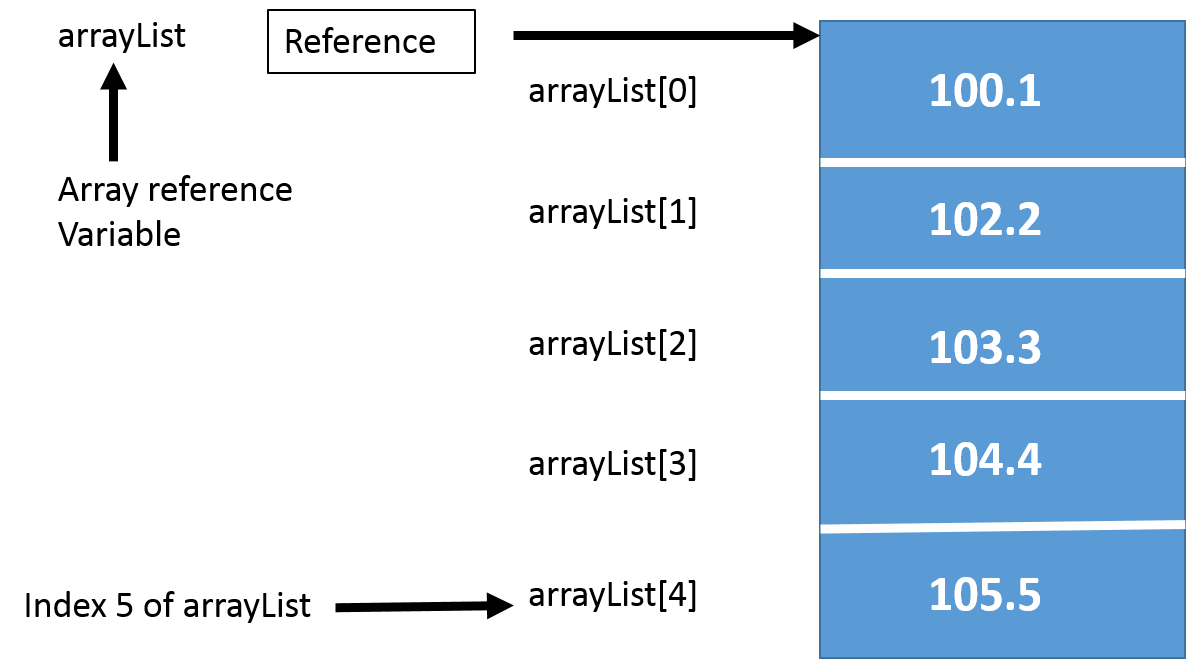
Processing Arrays:
For processing array we can use either for loop or foreach loop because all of the elements in an array are of the same type and the size of the array is known.
Example:
Here is a complete example of showing how to create, initialize and process arrays:
public class ArrayDemo {

   public static void main(String[] args) {
      double[] arrayList = {100.1,102.2,103.3,104.4,105.5};

      // Print all the array elements
      for (int loop_var = 0; loop_var < arrayList.length; loop_var++) {
         System.out.println(arrayList[loop_var] + " ");
      }
      // multiplying all elements
      double multiply = 1.0;
      for (int loop_var1 = 0; loop_var1 < arrayList.length; loop_var1++) {
         multiply *= arrayList[loop_var1];
      }
      System.out.println("multiplication of numbers is " + multiply);
      }
}
This would produce following result:
100.1
102.2
103.3
104.4
105.5
multiplication of numbers is 1.1639605286509197E10
The foreach Loops:
JDK 1.5 introduced a new for loop, known as foreach loop or enhanced for loop, which enables you to traverse the complete array sequentially without using an index variable.
Example:
The following code displays all the elements in the array myList:
public class TestArray {

   public static void main(String[] args) {
double[] arrayList = {100.1,102.2,103.3,104.4,105.5};
// Print all the array elements
for (double element: arrayList)
 {
System.out.println(element);
}
}
}
This would produce following result:
100.1
102.2
103.3
104.4
105.5
Passing Arrays to Methods:
Just as you can pass primitive type values to methods, you can also pass arrays to methods. For example, the following method displays the elements in an int array:
public static void printArray(int[] array) {
  for (int i = 0; i < array.length; i++) {
    System.out.print(array[i] + " ");
  }
}
You can invoke it by passing an array. For example, the following statement invokes the printArray method to display 3, 1, 2, 6, 4, and 2:
printArray(new int[]{3, 1, 2, 6, 4, 2});
Returning an Array from a Method:
A method may also return an array. For example, the method shown below returns an array that is the reversal of another array:
public static int[] reverse(int[] list) {
  int[] result = new int[list.length];

  for (int i = 0, j = result.length - 1; i < list.length; i++, j--) {
    result[j] = list[i];
  }
  return result;
}
The Arrays Class:
The java.util.Arrays class contains various static methods for sorting and searching arrays, comparing arrays, and filling array elements. These methods are overloaded for all primitive types.
| SN | Methods with Description |
|---|---|
| 1 | public static int binarySearch(Object[] a, Object key) Searches the specified array of Object ( Byte, Int , double etc) for the specified value using the binary search algorithm. The array must be sorted prior to making this call. This returns index of the search key, if it is contained in the list; otherwise, (-(insertion point + 1). |
| 2 | public static boolean equals(long[] a, long[] a2) Returns true if the two specified arrays of longs are equal to one another. Two arrays are considered equal if both arrays contain the same number of elements, and all corresponding pairs of elements in the two arrays are equal. This returns true if the two arrays are equal. Same method could be used by all other premitive data types ( Byte, short, Int etc.) |
| 3 | public static void fill(int[] a, int val) Assigns the specified int value to each element of the specified array of ints. Same method could be used by all other premitive data types ( Byte, short, Int etc.) |
| 4 | public static void sort(Object[] a) Sorts the specified array of objects into ascending order, according to the natural ordering of its elements. Same method could be used by all other premitive data types ( Byte, short, Int etc.) |
 Abhiyukti